
Table of Contents
Domain mapping makes it possible to use multiple domains for a single website. This comes in handy when using content management systems like WordPress: You can structure multiple domains and subpages and connect them with each other. This makes it easier for users to navigate your web presence, while also allowing you to keep a neat overview of your content. Keep reading to find out how to use domain-mapping.
What is domain mapping?
Domain-mapping makes it possible to connect several domains with your main domain or content management system (CMS). You can use domain name mapping to, for example, register individual domains for different departments, product categories, or services and still manage them in the same WordPress installation. In short, domain mapping makes it possible to have several independent, distinctive domains and manage them centrally. This makes it easier for users to navigate your web content without having to click through subpages.
How does domain mapping work?
Mapping a domain is quite easy and very convenient: One web server is associated with several domains. That way, users have different ways to get to your content. This is relevant for multi-site structures, in which different subpages and landing pages have their own domains but everything can be managed centrally in your CMS. In addition, you can easily add existing domains from other providers to your web presence.
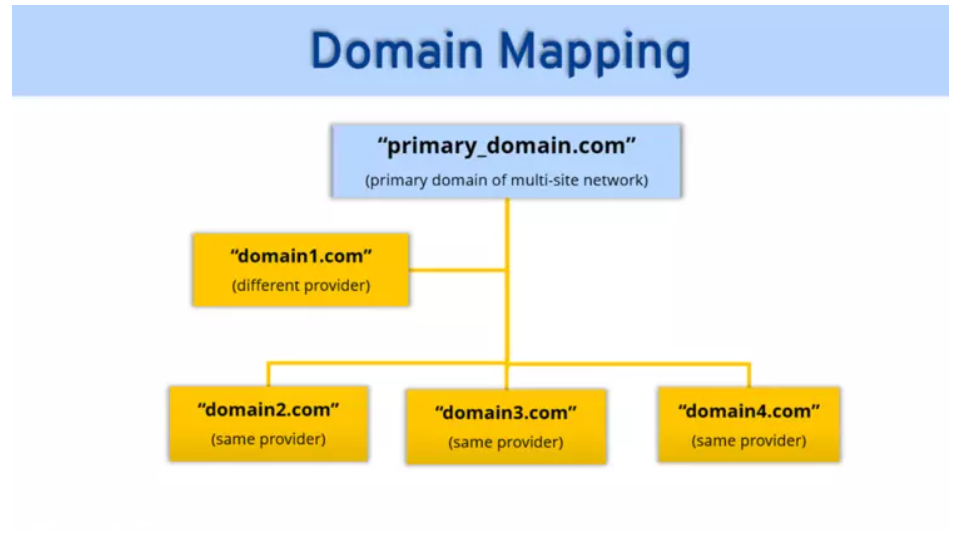
For example, WordPress makes this possible with its multi-site feature, which you can use to divide up a single WordPress installation into several connected domains. That way you can create separate subpages for customer service, your company blog, an online shop or local franchise sites and unite everything under the umbrella of your main domain.
Why use domain mapping?
Domain mapping is especially useful for companies and website operators that work with diverse sets of products, services, or topics. Mapping a domain makes it possible to connect a network of distinctive domains and thus make it easier to claim related domain names for yourself. It also makes it easier for users to find the part of your site that they need. Since all of the separate domains link to your main domain, it makes updating and maintaining your subpages significantly easier.
The advantages and disadvantages of domain mapping
Advantages
The advantages of domain name mapping are pretty clear. If you use a CMS, you can take care of the maintenance and update of your domains all in one place. You’ll save time and money, since all your domains are part of your “domain map”.
With domain mapping you can also secure several domains that are relevant to your brand. The domains won’t just sit around “parked” but can be connected with your main domain. That way you can optimize your reach, reach out to new customers, and increase your traffic. And it’s also possible to use domain mapping to integrate existing domains into your system without spending a lot on domain switching, WordPress migration or host changes.
Disadvantages
Some disadvantages of domain mapping result from CMS structures like the WordPress Multisite feature. If you don’t have sufficient knowledge of your CMS, mapping a domain can be difficult to implement. So be prepared to learn about how multi-site networks and domain mapping work before diving in.
How to Get Started with Domain Mapping
Domain mapping offers numerous advantages over redirecting a URL. Here’s a basic overview of how to map your domains:
- Setup WordPress multisite: Install WordPress and add define(‘WP_ALLOW_MULTISITE’, true); to your wp-config.php just above the /* That’s all, stop editing! Happy blogging. */ line. Then save and upload the file back to your server. This enables the multisite feature.
- Configure DNS for custom domains: This step assumes you’ve already purchased a custom domain. The next step is to change their name servers to point to your hosting account. Note that this can take 48 to 72 hours to propagate.
- Add the domains to your hosting: You’ll need to add your domains to your hosting account. Go to your cPanel and click the Aliases or Parked Domain icon (they’re both the same). Then simply enter your custom domain URL to add it to your account.
- Map a subsite to a custom domain: Login to your WordPress and add a new network site (Sites > Add New). You’ll need to give new sites a subdomain or subdirectory name when you first add them. From there, click the Edit link and add your custom domain to the Site Address field to map it. Then click Save Changes.
Once the process is complete, visitors to your custom domain will be taken to the subsite you mapped it to. Then it’s just a matter of repeating the steps above to map additional custom domains.
Keep in mind that even if your primary domain has an SSL certificate, you’ll need to install it on each custom domain to encrypt data transfers.
Domain mapping vs. domain transfer
The main difference between domain mapping and a complete domain transfer is also one of the main advantages of domain mapping: If you have a contract with a service provider for your WordPress site, you won’t be able to transfer or change your WordPress domain without spending a lot of money doing it. It’s much easier to connect independent domains with already mapped domains without switching your provider or server. While a domain transfer from one provider to another entails transferring all content to a new server including the AuthCode, with domain mapping you can simply link your various domains to your main domain.
Domain mapping vs. domain redirecting
If you want to secure catchy domains for trademark reasons or increase your reach with similar domain names, domain redirecting might be the thing for you. With domain redirecting, users will be redirected to your target domain even if they didn’t originally search for it.
With domain mapping, on the other hand, it’s not about being redirected. Instead, you’re dealing with a separate domain with its own content, which is connected to a multi-site network and links to it. Users are on the secondary domain but are shown content from the main domain. The URL in the browser doesn’t change.
Redirecting allows you to point multiple domains to one website.
For example, you could redirect site.net and site.org to site.com. Visitors to the .net or .org top-level domain (TLD) will automatically be redirected to the .com TLD, which they’ll see in their browser.
Domain mapping achieves the same thing, but with a key difference.
Let’s say you have a page on your site to market a product or service and the URL is example.com/yourlatestproduct.
It’s a long domain and not that easy to remember.
Instead, you want to use yourlatestproduct.com. It’s a shorter domain and you can use it on different marketing channels.
While you can redirect yourlatestproduct.com, visitors will still see the longer URL in their browser.
Domain mapping keeps visitors on your custom domain despite the actual content residing on a different host. Setting up domain mapping can be tricky, but it offers many advantages.
Now let’s look at the different use cases of domain mapping and why it’s worth a closer look.