Table of Contents
If your domain is under a domain transfer lock, you will be unable to transfer it. If your domain is transfer locked, it could be due to the following factors:
- Registrar Lock: This is an internal lock that we, your domain registrar, place on your domains in an effort to keep them from being transferred or moved to another account by anyone other than the owner. Find how to unlock your domain.
- New Registration: Domains within 60 days after initial registration can not be transferred. This cannot be adjusted and is a part of ICANN policy.
Note: If you are setting any kind of transfer lock within your domainregistrationindia customer account, this refers to the first type of domain transfer lock listed above, Registrar Lock.
A domain transfer lock is sometimes called a registrar lock, a transfer lock, or a domain lock.
Essentially, transfer lock is a protection mechanism that prevents your domain from being stolen or deleted.
What is the 60 days lock?
When you register a domain (gTLD) or transfer it to another registrar (usually your web hosting provider), the domain will be locked for 60 days. During this period the domain cannot be transferred.
It is part of the transfer policy from ICANN and applies to all registrars. We are unable to remove the lock or make any exceptions.
Changes in the owner details
When you change the registrant name, company or email address of a domain in the WHOIS, by default the domain will also be locked for 60 days.
In this case it is possible to opt out of the lock. You can select this during the owner change procedure. It is not possible to opt out, after the change has been processed.
How can I remove the domain transfer lock?
Important note beforehand: Some top-level domains (such as .com or .org) can only be unblocked and transferred after a blocking period of 60 days after their registration or a Whois update.
If the block period has expired and you want to transfer your world4you domain to another provider, it is necessary to lift this transfer lock.
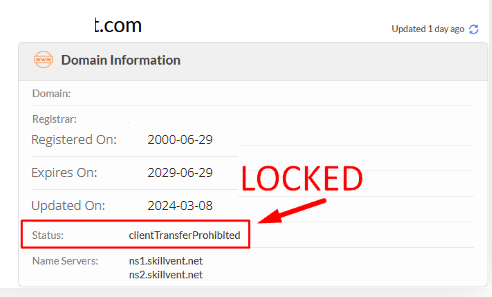
Domain in Lock Status: Below image shows the domain Lock Status.
Simply you can send a mail to support@domainregistrationindia.co.in, you will get an EPP/Transfer code via same email.
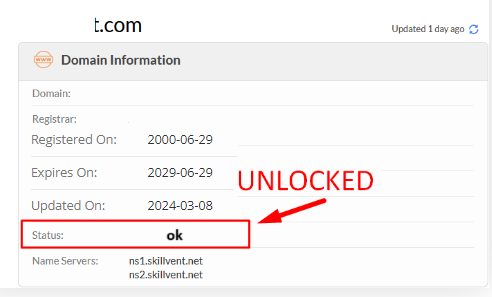
Domain in Un-Lock Status: Below image shows the domain Lock Status.