Table of Contents
PTR record resolves an IP address (made up of numbers and decimals) into a domain name (such as example.com).
The act of translating an IP address into a domain name is known as a reverse lookup in the Domain Name System (DNS).
While we usually think of DNS as a means to go from a domain name to an IP address, one type of record is the opposite: the PTR record resolves an IP address to a domain name instead.
Why might you know the IP without knowing the domain name? These oddball DNS records are actually very valuable. In this article, we’ll explore why PTR matters, when you would use them, and how to set them up properly.
What is a PTR Record?
A PTR (or pointer) record resolves a given IP address to a domain name. Unlike the more conventional A record, which resolves a domain name to an IP, PTRs do the opposite, which is why they’re sometimes called a reverse DNS lookup.
PTR records are formatted with the IP address written backward, then a special reserved in-addr.arpa domain.
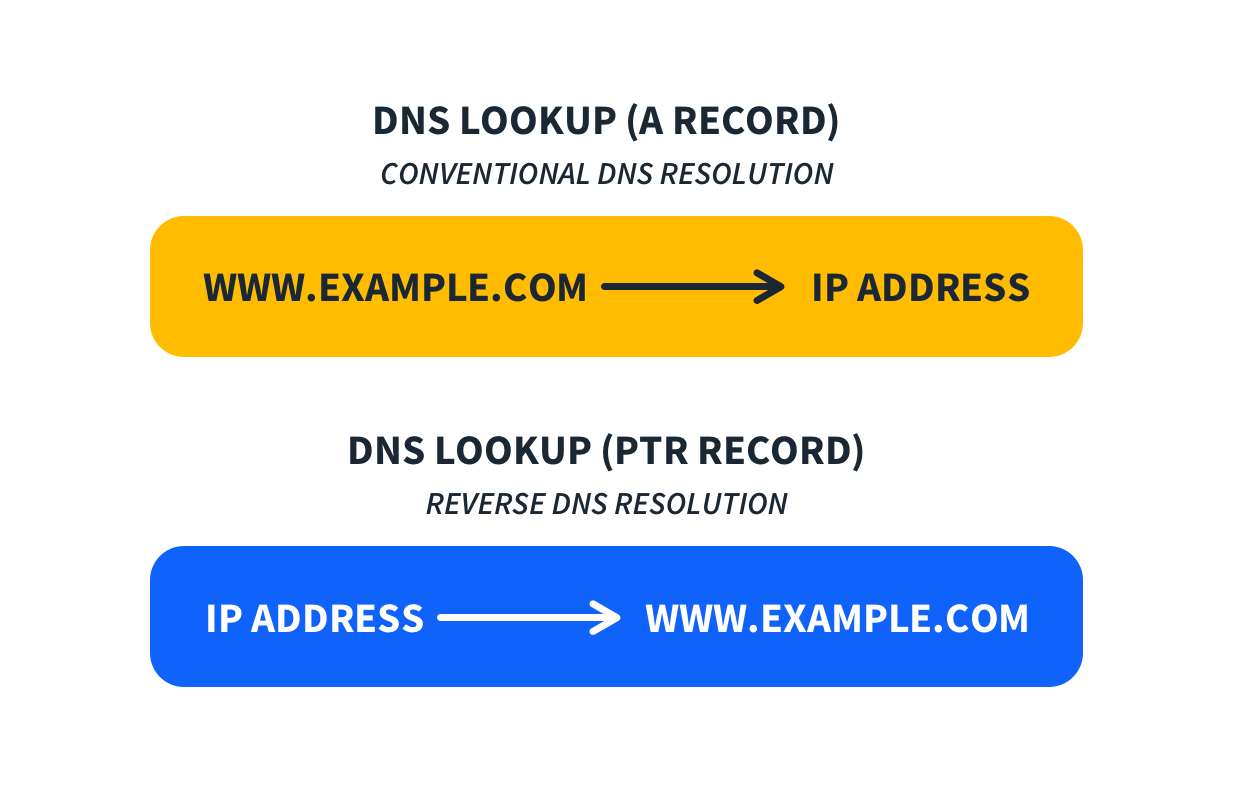
So, for the IP 1.2.3.4, the PTR would be 4.3.2.1.in-addr.arpa. The IP is backward because domains like the .com or .org top-level domains are always organized with the topmost level information on the right.
What does a DNS PTR record do?
Every computer has a unique IP address, per the DNS that powers the internet. You may never know your IP address, but no other computer can reach you without it.
Connected devices use IP addresses exclusively. But if you know the IP address, you may want to know the formal domain name too.
Enter the DNS PTR tool.
Use the DNS PTR tool to perform a reverse lookup and translate the numbers into a web address you can both read and understand.
Why are PTR Records Important?
PTR records are like caller IDs for servers. Back before caller ID, you had to actually answer the phone to know who was calling. With caller ID, though, you can verify the caller’s identity even answering by simply looking at your phone.
Servers can verify an incoming “call” by checking the PTR record when authenticating the “caller” is important. For example, when confirming an email is coming from the actual mail server of a domain and not a scammer.
Mail servers are the most common use case for PTR records. A mail server receiving a message will check the IP address the connection is coming from and look up the PTR record for that IP.
If the PTR doesn’t match the sending domain (the “from” address in the message), the mail server can be set to reject or quarantine the message. If the IP has no PTR, just like if you might pause before answering a phone call that says “Private” or “Unknown” for the caller ID, the mail server can choose to reject the message.
This behavior for mail servers is a spam filtering measure. The verification that PTR records provide helps establish trust in the identity of a sending mail server.
Why do you need PTR records?
As we mentioned, the average computer user has no need for a DNS PTR record. But there are many reasons for security experts to use the tool.
You might use PTR records for:
- Validation. Some email servers won’t accept notes from servers that don’t have PTR records set up properly. Attending to this step is a little like proving that you have pure intentions.
- Safety. Just as you need PTR records to validate your outgoing email, you should expect your communication partners to do the same.
- Investigation. Some systems store only IP addresses, not domain names. You might need PTR records to understand where traffic originates.
- Trust and Verification: PTR records ensure that the given hostname or domain is correctly connected to the IP address.
- Email Servers Requirement: PTR records are essential for outgoing mail servers, particularly those using SMTP (Simple Mail Transfer Protocol), because most mail providers reject or mark as spam messages from mail servers without valid Reverse DNS configuration.
- Avoiding Spam Filters: Emails sent from servers with missing PTR records or mismatched A records are often rejected or marked as spam.
- Industry Standard: This practice has become a standard as all mail providers strive to keep spam out of their clients’ inboxes.
DNS PTR records are stored under the IP address with “.in-addr.arpa” added in IPv4, and they’re stored under the IPv6 address, converted into four-bit sections with “.ip6.arpa” added in IPv6.