Table of Contents
Addon Domain and Subdomain – Before adding an Addon Domain name you need to point your addon domain name server to your main domain name server and you will need to wait for domain propagation. It usually takes between 12 and 24 hours.
If you buy a domain name from domainregistrationindia and add it to a specific domainregistrationindia hosting account, that bit will be done for you.
What is Addon Domain
Addon domains allow you to control multiple domains from a single cPanel account. An addon domain links a new domain name to a subdirectory of your account’s home or public_html (document root) directory and then stores its files in that subdirectory.
How to create an Addon domain
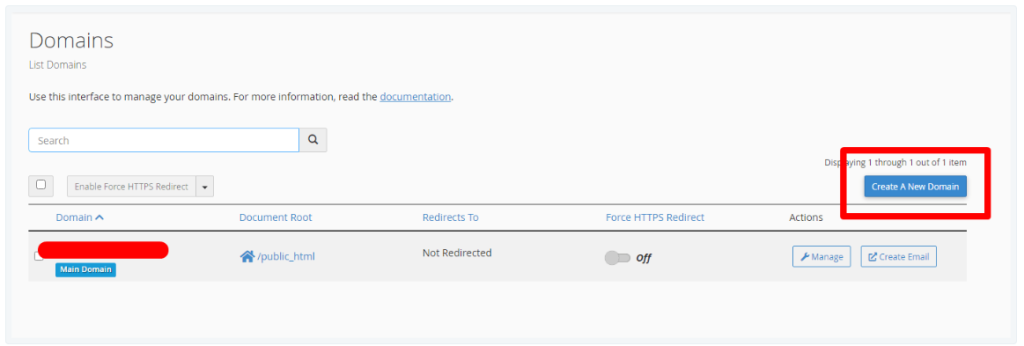
If you are using the Jupiter theme, you need to click on Domain.

Now Click Create a New Domain button to create a subdomain or Addon Domain.
In the Domain field, Enter the domain that you would like to create. It could be subdomain or Addon Domain you want to create. After that, uncheck the check box of ‘share document root’ options for create the domain outside the “public_html” directory and then click on the Submit button.
Step 1. To add an Addon domain in the Jupiter cPanel theme, you will need to enter the name of the domain in the “Domain” text box.
Step 2. Uncheck the option that says “Share document root (/home/username/public_html) with ‘domain.tld’.” This will ensure that the files for this domain are not stored in the same location as your other domains.
Step 3. Next, you will need to specify the directory where you want the files for this domain to be stored.
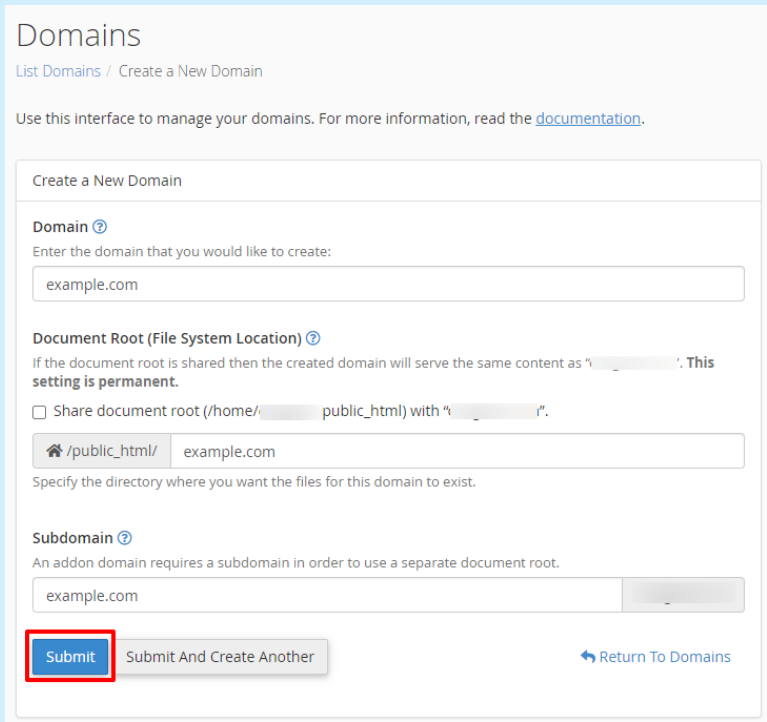
Step 4. Once you have completed these steps, click on the “Submit” button to add the new domain to your cPanel account.
What is Subdomain?
Any domain that you want to create from an existing domain is called a subdomain. How many subdomains you can add to your hosting account will depend on the hosting package that you are buying. subdomain works as a child domain of an existing domain (i.e. blog.example.com) and you can upload the files of the website under the specified folder under “public_html” for that subdomain.
How to create an Sub-domain
A subdomain allows you to create a new subdomain for your existing domain.
Step 1. To add a new subdomain in the Jupiter cPanel theme, you will need to specify the name of the subdomain in the “Domain” text box.
Step 2. Uncheck the option that says, “Share document root (/home/username/public_html) with ‘domain.tld‘.” This will ensure that the files for this subdomain are not stored in the same location as your other domains.
Step 3. You should also enter the name of the directory where the files for this subdomain will be stored.
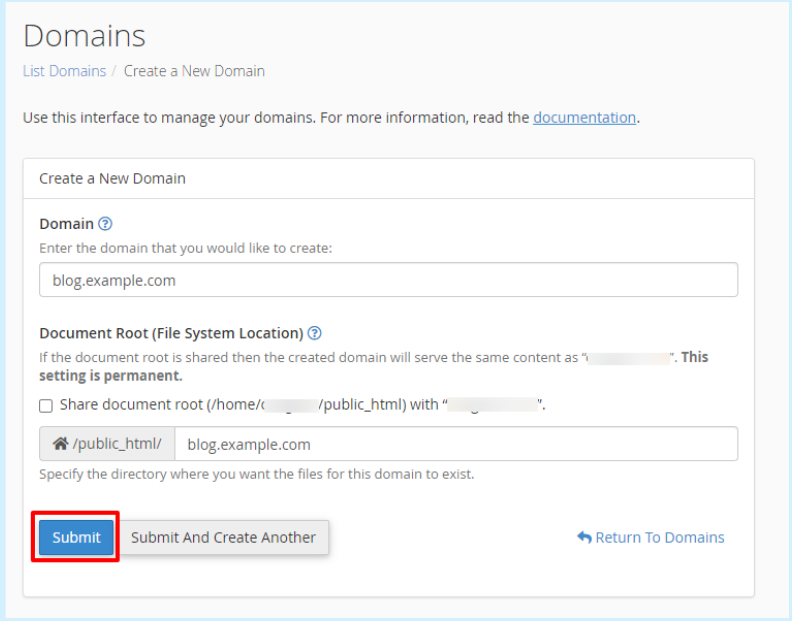
Step 4. Once you have completed these steps, click the “Submit” button to add the new subdomain to your cPanel account.